

Array in PHP
Advertisements
Array in PHP
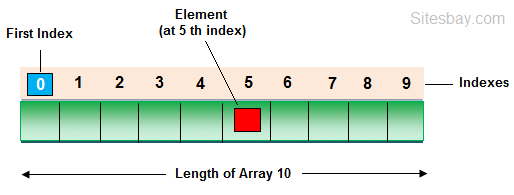
In PHP Array is used to store multiple values in single variable. An array is a special variable, which can hold more than one value at a time.
Create an Array in PHP
In PHP, the array() function is used to create an array.
Array Syntax
array();
Types of Array in PHP
There are three types of array in php, which are given below.
- Indexed arrays - Arrays with a numeric index
- Associative arrays - Arrays with named keys
- Multidimensional arrays - Arrays containing one or more arrays
Indexed Arrays
The index can be assigned automatically (index always starts at 0), you can see in below example;
Array Example
<?php

$student = array("Harry", "Varsha", "Gaurav");
echo "Class 10th Students " . $student[0] . ", " . $student[1] . " and " . $student[2] . ".";

?>
Output
Class 10th Students Harry, Varsha and Gaurav
Find Length of an Array in PHP
Using count() function you can find length of an array in php.
Array Example
<?php

$student = array("Harry", "Varsha", "Gaurav");
echo "Length of Array: ";
echo count($cars);

?>
Output
Length of Array: 3
Array Example using for Loop
Array Example
<?php

$student = array("Harry", "Varsha", "Gaurav");
$arrlength = count($student);

for($i = 0; $i < $arrlength; $i++)
{
    echo $student[$i];
    echo "<br>";
}

?>
Output
Harry
Varsha
Gaurav
Associative Arrays in PHP
In this type of array; arrays use named keys that you assign to them.
Syntax
$age = array("Harry"=>"10", "Varsha"=>"20", "Gaurav"=>"30");

or

$age['Harry'] = "10";
$age['Varsha'] = "20";
$age['Gaurav'] = "30";
Multidimensional Arrays in PHP
A multidimensional array is an array containing one or more arrays. For a two-dimensional array you need two indices to select an element
Array Example
<?php
$student = array
  (
  array("Harry",300,11),
  array("Varsha",400,10),
  array("Gaurav",200,8),
  array("Hitesh",220,8)
  );

$student = array("Harry", "Varsha", "Gaurav");
echo $student[0][0].": Marks: ".$student[0][1].", Class: ".$student[0][2].".<br>";
echo $student[1][0].": Marks: ".$student[1][1].", Class: ".$student[1][2].".<br>";
echo $student[2][0].": Marks: ".$student[2][1].", Class: ".$student[2][2].".<br>";
echo $student[3][0].": Marks: ".$student[3][1].", Class: ".$student[3][2].".<br>";

?>
Output
Harry: Marks: 300 Class: 11
Varsha: Marks: 400 Class: 10
Gaurav: Marks: 200 Class: 8
Hitesh: Marks: 220 Class: 8
Google Advertisment