

HashMap in Java
Advertisements
HashMap in Java
HashMap are the Implementer class of Map Interface, which store the values based on the key.
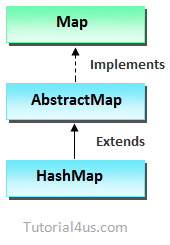
Points to Remember
- HashMap are not allows to store duplicate elements.
- HashMap are new collection framework class.
- HashMap may have one null key and multiple null values.
- For retrieving elements from HashMap you can use foreach loop, Iterator Interface and ListIterator Interface to retrieve the elements.
- HashMap is not Synchronized means multiple threads can work Simultaneously.
Example of HashMap
import java.util.*;

class HashMapDemo
{
public static void main(String args[])
 {
  HashMap<Integer,String> hm=new HashMap<Integer,String>();
  hm.put(1,"Deo");
  hm.put(2,"zen");
  hm.put(3,"porter");
  hm.put(4,"piter");

 for(Map.Entry m:hm.entrySet())
 {
   System.out.println(m.getKey()+" "+m.getValue());
 }
 }
}
Output
1 Deo
2 zen
3 porter
4 piter
Example of HashMap
import java.util.*;

class HashMapDemo
{
public static void main(String args[])
	{
	HashMap<Integer, Float> hm=new HashMap<Integer, Float>();
	hm.add(10, 10.5);
	hm.add(20,20.5);
	hm.add(30,30.5);
	hm.add(40,40.5);
	hm.add(Null,50.5);
	hm.add(Null,60.5);  // only one null allow
   System.out.println(hm);
   System.out.println(hm.values());
   System.out.println(hm.keyset());
   System.out.println(hm.get(20));
	}
}
Output
[null=60.5, 20=20.5, 10=10.5, 40=40.5, 30=30.5]
[60.5, 20.5, 10.5, 40.5, 30.5]
[Null, 20, 10, 30, 40]
[20.5]
Google Advertisment